FreeNo account neededDOCX

Meeting minutes template

Free and editable. Download the blank template and use the filled example as a guide.

DOCX

Meeting minutes: Mobile app launch sync

Date and time
Thursday, November 6, 2026, 10:00–10:30 a.m. ET
Location
Google Meet
Facilitator
Maya Patel, Product
Note taker
Daniel Kim, Product
Attendees
Maya Patel, Daniel Kim, Luis Ortega (Engineering), Hannah Brooks (Design), Priya Shah (Marketing)

Agenda

  1. Launch date
  2. Onboarding flow
  3. Marketing budget

Discussion

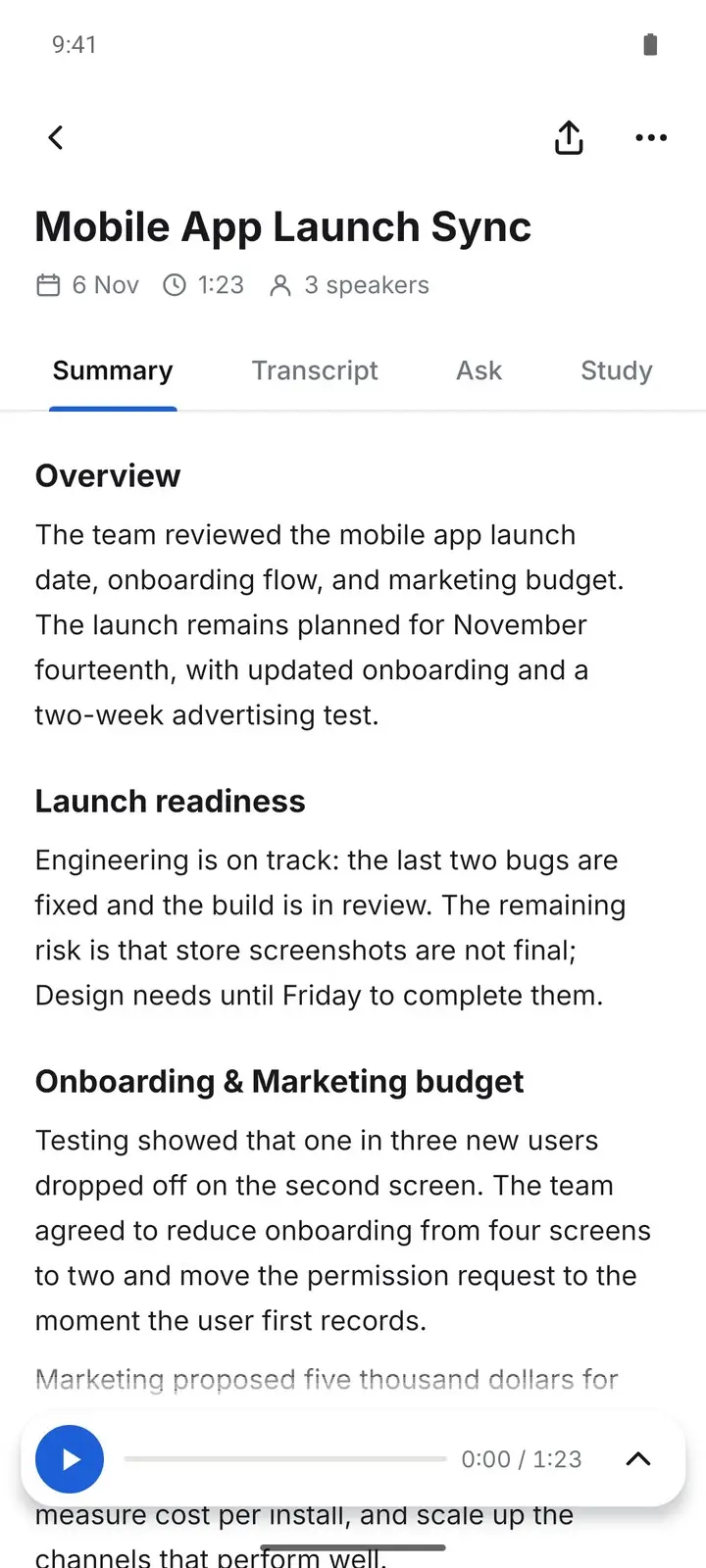
Launch date. Engineering is on track: the last two bugs are fixed and the build is in review. The open risk is that store screenshots are not final; Design needs until Friday.

Onboarding flow. Testing showed that one in three new users dropped off on the second screen.

Marketing budget. Marketing proposed $5,000 for a two-week advertising test, measuring cost per install before scaling the channels that perform well.

Decisions

  • Keep November 14 as the launch date.
  • Cut onboarding from four screens to two.
  • Approve the two-week, $5,000 advertising test.

Action items

ActionOwnerDue
Finish final store screenshotsHannah BrooksNov 7
Ship two-screen onboarding buildLuis OrtegaNov 11
Set up ad test and cost-per-install reportPriya ShahNov 12

Next meeting

Thursday, November 13, 2026, 10:00 a.m. ET: launch go/no-go.

How to use this meeting minutes template

Before the meeting

Fill in the details, attendees and agenda. Share the agenda so people come prepared.

During the meeting

Note the key points under each agenda item. Write decisions as complete sentences, exactly as agreed.

Within 24 hours

Add an owner and due date to every action item, then send the minutes to attendees and anyone absent.

From a recording

Generate minutes from a recording

SummaryNote turns a meeting recording into a summary organized by topic, with the agreements and open risks, plus the full transcript with speakers and timestamps. Paste the parts you need into this template, or export the note to DOCX.

  • Record on Android or in the browser, or upload the file
  • On Android with Pro, paste a Google Meet or Teams link to send a notetaker
  • Export to DOCX, PDF or Markdown, free

First complete note freeNo card needed

Free: audio or video up to 3 hours per file. Pro: up to 5 hours. Max file 500 MB.

A man in an online meeting at his desk
Meeting summary of Mobile App Launch Sync in the Android app

Tips for minutes people actually read

Record decisions, not dialogue

Minutes are a record of what was agreed. Summarize the discussion in one or two sentences and keep the detail in the transcript.

Every action needs one owner

“The team will look into it” never happens. Name one person and a date for each item.

Send them the same day

Minutes sent within a few hours get corrected while memories are fresh. A week later, nobody checks them.

Keep the format the same

Use one template for a recurring meeting so people know where to look for decisions and their own tasks.

Related templates and tools

Meeting agenda template

Plan topics, owners and time per item.

DOCX
Cornell notes template

The classic study layout with cue and summary areas.

PDF, DOCX
AI meeting notes

Minutes, decisions and action items from a recording.

Web and Android

Questions, answered

About meeting minutes.

What should meeting minutes include?

The meeting details and attendees, the agenda, a short summary of each discussion, the decisions made, action items with an owner and due date, and the date of the next meeting.

Who should take the minutes?

Someone who is not running the meeting. The facilitator keeps the discussion moving; the note taker captures decisions and actions.

Is this template free?

Yes. Download it as DOCX. No account needed.

Can SummaryNote fill in the template for me?

SummaryNote writes a summary and full transcript from your recording. You can copy those into this template or export the note as DOCX; it does not fill this exact layout automatically.

What is the difference between minutes and meeting notes?

Minutes are the formal record shared with the group: decisions and actions. Meeting notes can be informal and personal. Many teams now record the meeting and keep both.

Turn your next meeting into notes

Record it or upload the file. Your first complete note is free.

Meeting summary in the Android app